Lin Fangyuan's Project Portfolio Page
Project: MrTechRecruiter
Overview
MrTechRecruiter (MTR) is a desktop applicant management application designed for tech companies to keep track of job applicants. The user interacts with it using a CLI, and it has a GUI created with JavaFX. It is written in Java, and has about 10 kLoC.
Summary of Contributions
Code contributed: RepoSense link
Enhancements implemented
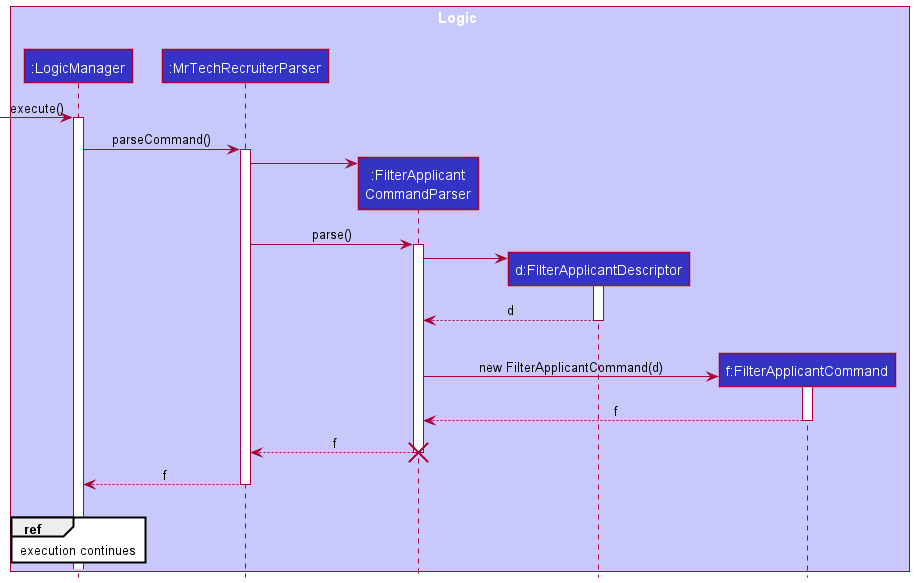
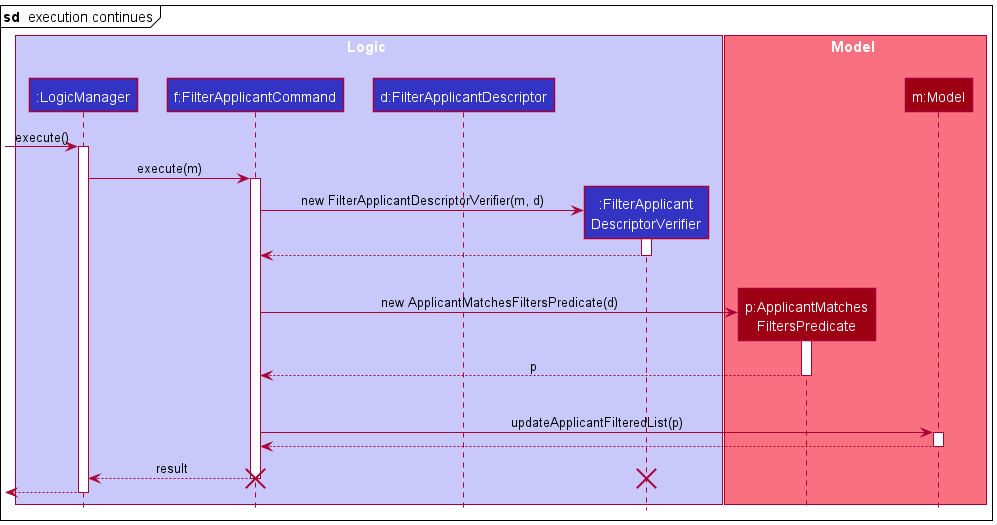
- Added the feature to filter applicants [PR: #83]
- What it does: Allows the user to filter applicants in the system based on various criteria.
- Justification: A filter feature is essential in helping the user in identifying suitable candidates, especially when dealing with high volumes of applicants.
- Highlights:
- Making the feature scalable so that future developers can easily add more filter criteria with minimal additions to the code.
- Parsing a variable number of filtering criteria from the user into a single condition.
- Added the feature to visualize job positions with a pie chart [PR: #106]
- What it does: Allows the user to a position & its applicants’ statuses as a pie chart.
- Justification: Gives the user a quick, visual overview of a position, which is crucial when dealing with large volumes of applicants/positions.
- Highlights:
- Processing MTR data into the format required by the PieChart API.
- Created a lightweight component used to display a pie chart, written with reusability (extensible to future iterations of the feature, e.g. pie chart of all applicants) and maintainability (minimal dependencies, no separate FXML file) in mind.
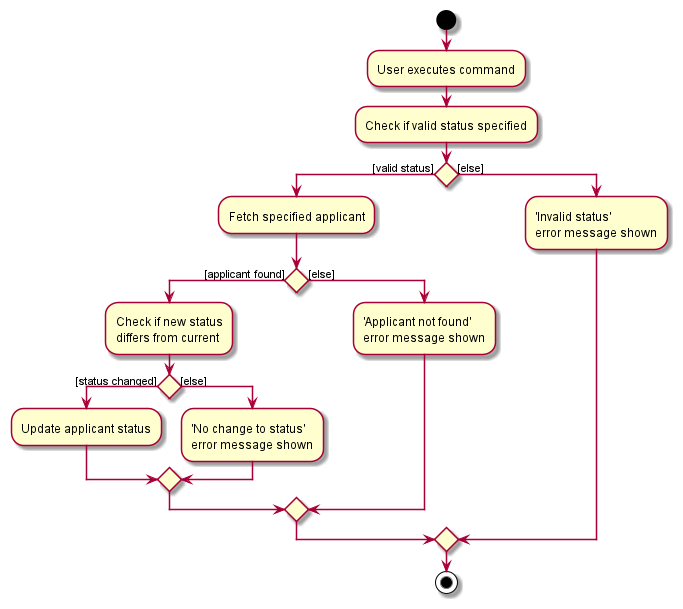
- Added the feature to update applicant’s application statuses [PR: #108]
- What it does: Allows the user to easily update applicants’ statuses.
- Justification: As users are likely to frequently update applicant statuses, providing a dedicated command for this helps streamline user workflow.
- Highlight: Multiple levels of input validation (e.g. specified applicant exists, specified status is valid, specified status is different from current status)
- Added
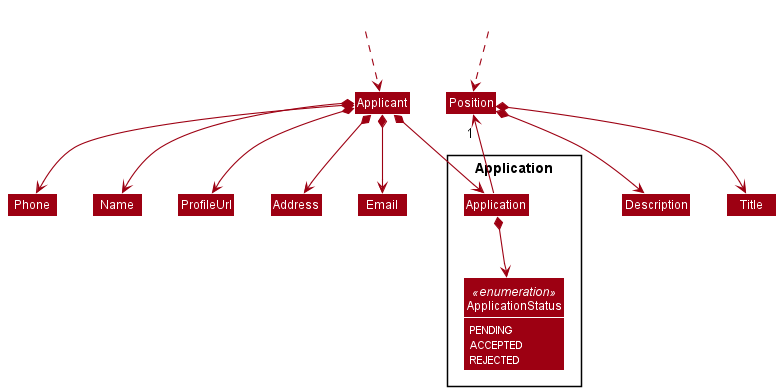
Applicationclass to model the applicant-position relationship [PRs: #81, #92]- Modeled the complex relationship between applicants and positions while preserving immutability of all classes involved.
- Added the
ApplicationStatusenum to reflect an applicant’s status & associated methods for serialization & deserialization.
- Added logic to the model for model-position interactions [PRs: #53, #67, #194]
- Captured the interactions that arise from having two interdependent entities in the model (e.g. when a position is deleted, additional steps need to be taken to delete the applicants to that position, to avoid applicants to an already-deleted position).
- Wrote tests for existing features to increase coverage [PRs: #81, #92, #194]
Contributions to the UG
- Added initial UG skeleton [PR: #24], updated quick start screenshot, added documentation for
filter-applicant,visualizeandmarkcommands to the ‘Features’ and ‘Command Summary’ sections [PRs: #108, #118]
Contributions to the DG
- Added product scope, NFRs, glossary, contributed to user stories, use cases [PR: #24]
- Added
ApplicantandPositionclasses to the ‘Design’ section [PR: #200] - Added explanations, UML diagrams (of different types) to the ‘Implementation’ section & ‘Instructions for manual testing’ for the
filter-applicant,visualizeandmarkcommands [PR: #200]
Contributions to team-based tasks
- Setup of: GitHub team org & repo, GitHub Pages, GitHub Actions, Gradle
- Repo maintenance (Proper tagging of issues, milestone management, linking issues to PRs, etc.)
- Renaming of packages [PR: #59] (Scrapped due to potential complications)
Review contributions
- Significant PR reviews: Review of #50, Review of #81, Review of #111
Contributions to the Developer Guide (Extracts):

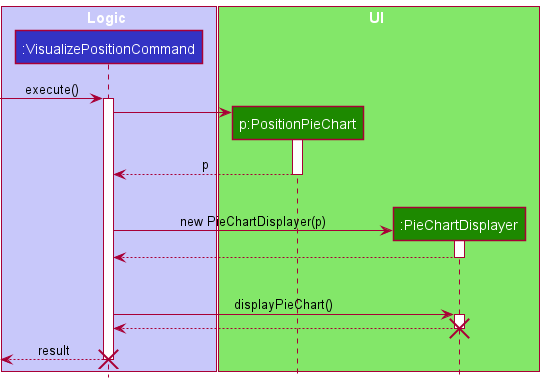
Contributions to the User Guide (Extracts):
Visualizing a position with a pie chart: visualize
Displays a pie chart breakdown of a position and the statuses of its applicants. Hovering over a pie chart slice will display its percentage value.
Format: visualize POSITION_TITLE
POSITION_TITLEis case-insensitive. e.g.visualize software engineerwill display the pie chart for the positionSOFTWARE ENGINEER.
Filtering applicants: filter-applicant
Filter the list of applicants by specific criteria.
Format: filter-applicant [pos/POSITION] [status/STATUS]
- The position filter is case-sensitive. e.g.
software engineerwill not matchSoftware Engineer - The status filter is case-insensitive. e.g.
acceptedorACCEPTEDwill both match the"Accepted"application status. - A variable number of filters can be specified, but at least one must be present.
- The filtering uses a logical
AND. e.g.filter-applicant pos/software engineer status/acceptedwill match all applicants applying to thesoftware engineerposition AND with application status"Accepted". - Consecutive calls are independent of one another (i.e. the filters do not stack).
Examples:
filter-applicant status/rejecteddisplays a list of all rejected applicants.filter-applicant pos/database administrator status/accepteddisplays a list of all applicants to thedatabase administratorposition, that have been accepted.
Updating an applicant’s status: mark
Updates an applicant’s status as specified.
Format: mark NAME status/STATUS
NAMEis case-sensitive. e.g.john doeandJohn Doewill update separate applicants’ statuses.STATUSis case-insensitive. e.g.acceptedandACCEPTEDwill both update the applicant’s status to"Accepted".- Note: Possible statuses are
ACCEPTED,REJECTEDorPENDING.
Examples:
mark john doe status/rejectedmarks the applicantJohn Doewith status"Accepted".
Command summary
| Action | Format, Examples |
|---|---|
| Filter Applicants | filter-applicant [pos/POSITION] [status/STATUS]e.g., filter-applicant pos/software engineer status/accepted |
| Update Applicant status | mark NAME status/STATUS e.g., mark john doe status/accepted |
| Visualize Positions | visualize POSITION_TITLEe.g., visualize database administrator |