Developer Guide
Table of Contents
- Introduction
- Acknowledgements
- Setting Up & Getting Started
- Design
- Implementation
- Appendix: Requirements
- Appendix: Instructions for manual testing
- Appendix: Effort
Introduction
MrTechRecruiter (MTR) is a standalone desktop app aimed in helping technology-related company recruiters overlook and administer job positions and applicants applying for various jobs in their companies.
With the advent of technology and related jobs, MTR uses Command-Line Interface (CLI) for quicker and easier typing for regular users while maintaining a exemplary Graphical User Interface (GUI).
Acknowledgements
- Adapted ideas from:
AddressBook Level-3 (AB-3) - Logic Design for
Undofrom:Stack Overflow - Documentation/Coding standard:
SE Student Projects
Setting up, Getting Started
Refer to the guide Setting Up & Getting Started.
Design
 Tip: The
 .puml files used to create diagrams in this document can be found in the diagrams folder. Refer to the PlantUML Tutorial at se-edu/guides to learn how to create and edit diagrams.
Architecture
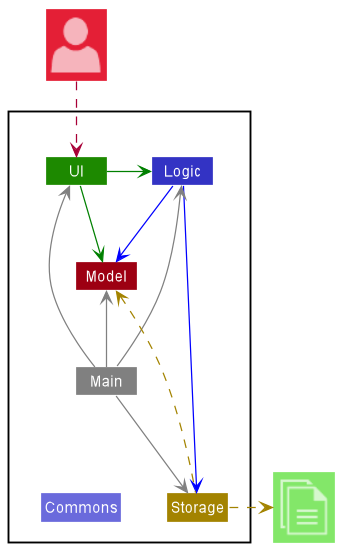
The Architecture Diagram given above explains the high-level design of the App.
Given below is a quick overview of main components and how they interact with each other.
Main components of the architecture
Main has two classes called Main
and MainApp. It is responsible for,
- At app launch: Initializes the components in the correct sequence, and connects them up with each other.
- At shut down: Shuts down the components and invokes cleanup methods where necessary.
Commons represents a collection of classes used by multiple other components.
The rest of the App consists of four components.
-
UI: The UI of the App. -
Logic: The command executor. -
Model: Holds the data of the App in memory. -
Storage: Reads data from, and writes data to, the hard disk.
How the architecture components interact with each other
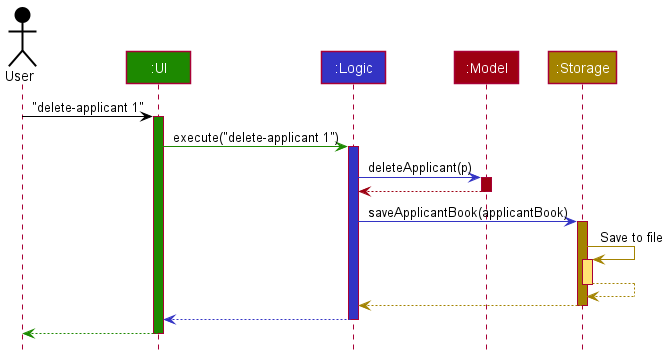
The Sequence Diagram below shows how the components interact with each other for the scenario where the user issues the command delete-applicant 1.
Each of the four main components (also shown in the diagram above),
- defines its API in an
interfacewith the same name as the Component. - implements its functionality using a concrete
{Component Name}Managerclass (which follows the corresponding APIinterfacementioned in the previous point.
For example, the Logic component defines its API in the Logic.java interface and implements its functionality using the LogicManager.java class which follows the Logic interface. Other components interact with a given component through its interface rather than the concrete class (reason: to prevent outside component’s being coupled to the implementation of a component), as illustrated in the (partial) class diagram below.
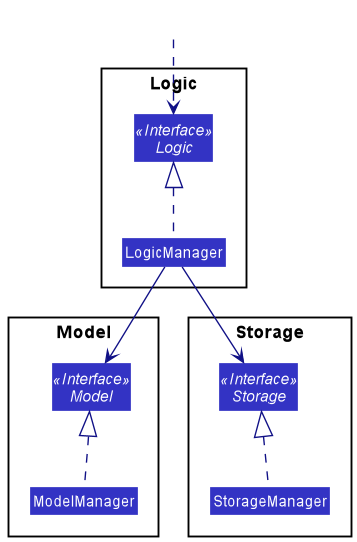
The sections below give more details of each component.
UI component
The API of this component is specified in Ui.java
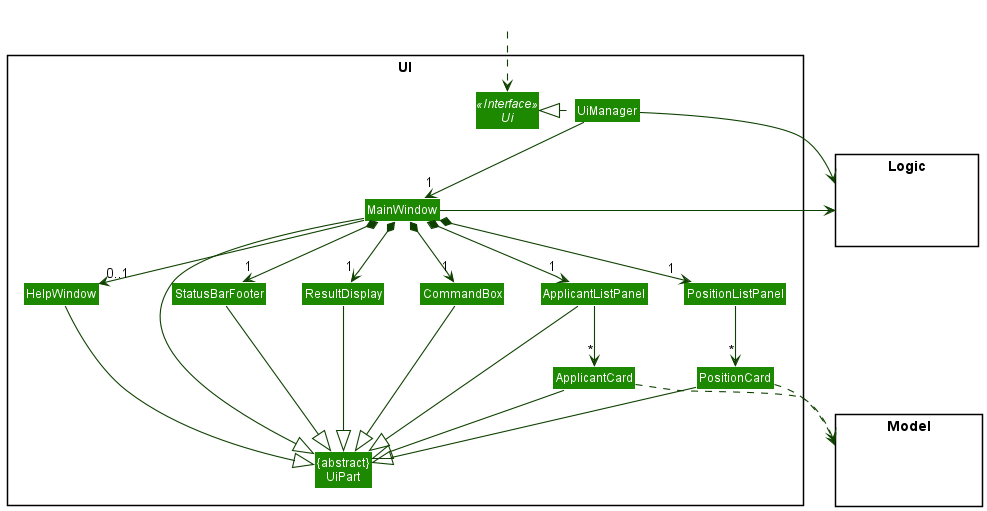
The UI consists of a MainWindow that is made up of parts e.g.CommandBox, ResultDisplay, ApplicantListPanel, StatusBarFooter etc. All these, including the MainWindow, inherit from the abstract UiPart class which captures the commonalities between classes that represent parts of the visible GUI.
The UI component uses the JavaFx UI framework. The layout of these UI parts are defined in matching .fxml files that are in the src/main/resources/view folder. For example, the layout of the MainWindow is specified in MainWindow.fxml
The UI component,
- executes user commands using the
Logiccomponent. - listens for changes to
Modeldata so that the UI can be updated with the modified data. - keeps a reference to the
Logiccomponent, because theUIrelies on theLogicto execute commands. - depends on some classes in the
Modelcomponent, as it displaysApplicantandPositionobjects residing in theModel.
Logic component
API : Logic.java
Here’s a (partial) class diagram of the Logic component:
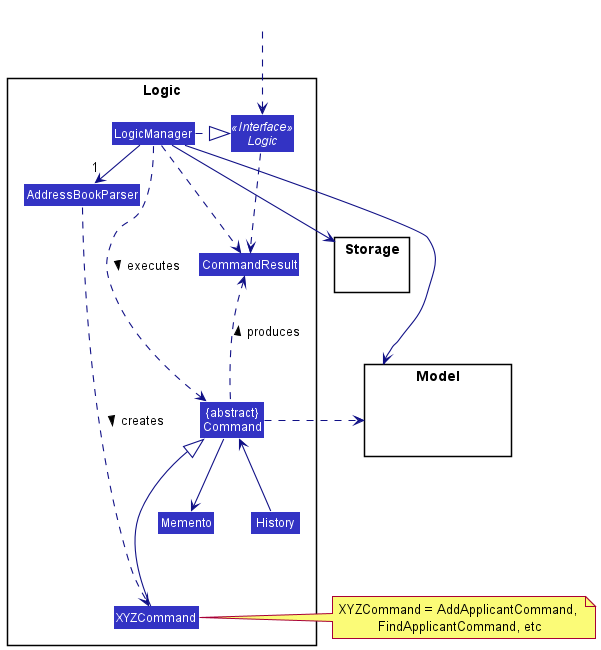
How the Logic component works:
- When
Logicis called upon to execute a command, it uses theMrTechRecruiterParserclass to parse the user command. - This results in a
Commandobject (more precisely, an object of one of its subclasses e.g.,AddPositionCommand) which is executed by theLogicManager. - The command can communicate with the
Modelwhen it is executed (e.g. to add a position). - The result of the command execution is encapsulated as a
CommandResultobject which is returned fromLogic. - While a modification command is happening, a record of the command’s message and the original state of the model before the command occurred is recorded in the separate
Mementoclass. - The abstract class
Commandis then called to return theMementoinstance (viaCommand#getMomento) of that state of the model and restores the original state of the model.
The Sequence Diagram below illustrates the interactions within the Logic component for the execute("delete-position 1") API call.
Interactions inside the Logic component for the delete-position 1 command
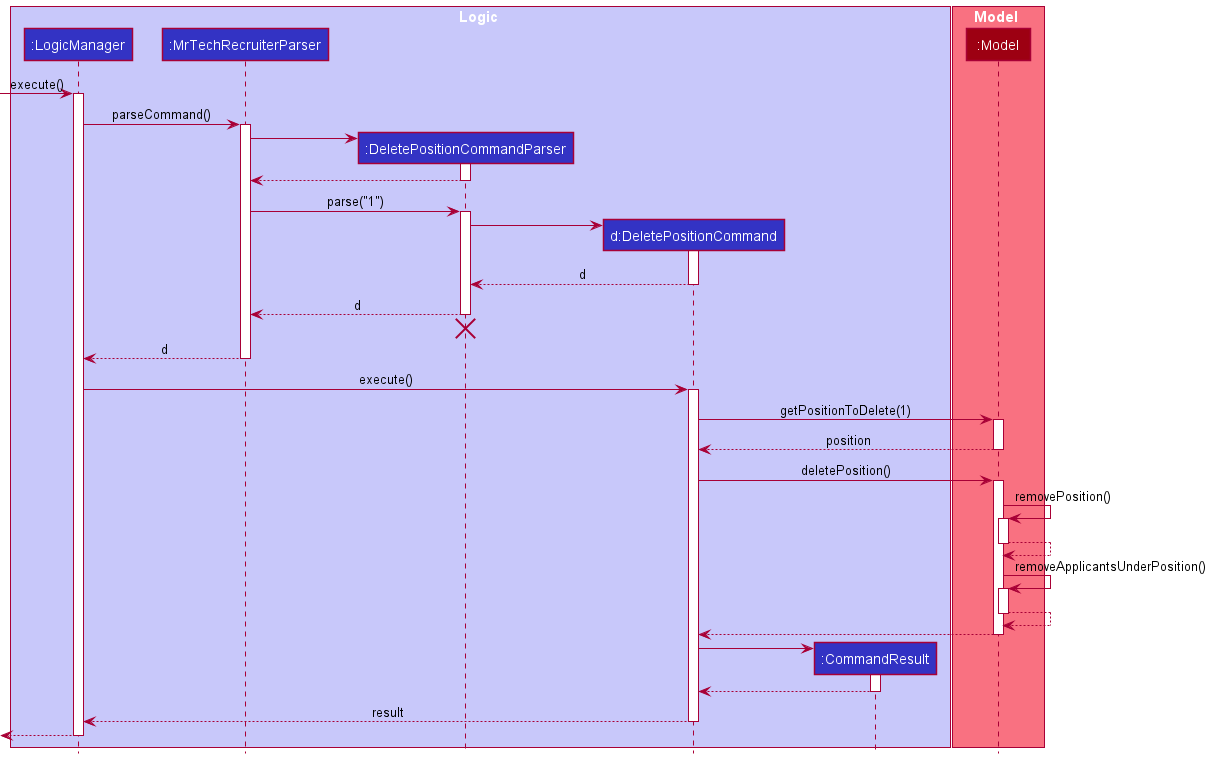
 Note: The lifeline for
 DeleteCommandParser should end at the destroy marker (X) but due to a limitation of PlantUML, the lifeline reaches the end of diagram.
Here are the other classes in Logic (omitted from the class diagram above) that are used for parsing a user command:
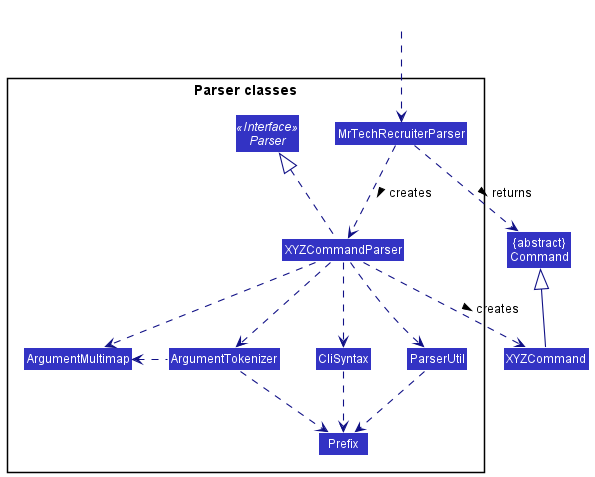
How the parsing works:
- When called upon to parse a user command, the
MrTechRecruiterParserclass creates anXYZCommandParser(XYZis a placeholder for the specific command name e.g.,AddPositionCommandParser) which uses the other classes shown above to parse the user command and create aXYZCommandobject (e.g.,AddCommand) which theMrTechRecruiterParserreturns back as aCommandobject. - All
XYZCommandParserclasses (e.g.,AddPositionCommandParser,DeleteApplicantCommandParser, …) inherit from theParserinterface so that they can be treated similarly where possible e.g, during testing.
Model component
API : Model.java
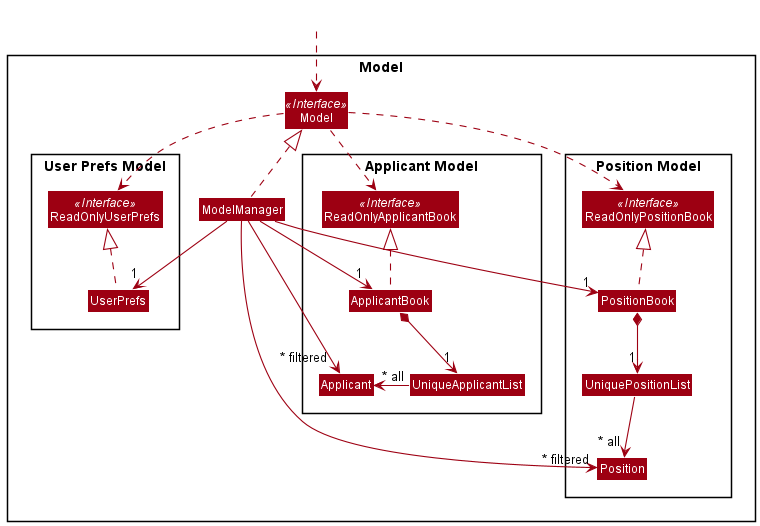
The Model component,
- stores the position book and applicant book data i.e., all
ApplicantandPositionobjects (which are contained in aUniquePositionListandUniqueApplicantListobject). - stores the currently ‘selected’
PositionandApplicantobjects (e.g., results of a search query) as a separate filtered list which is exposed to outsiders as an unmodifiableObservableList<Applicant>orObservableList<Position>that can be ‘observed’ e.g. the UI can be bound to this list so that the UI automatically updates when the data in the list change. - stores a
UserPrefobject that represents the user’s preferences. This is exposed to the outside as aReadOnlyUserPrefobjects. - does not depend on any of the other three components (as the
Modelrepresents data entities of the domain, they should make sense on their own without depending on other components)
Note: To avoid cluttering up the Model class diagram, classes like ReadOnlyPositionBook, PositionBook etc. are not added. However, they have similar relationships and structure as that of ReadOnlyApplicantBook, ApplicantBook etc.
Applicant and Position
The Applicant and Position classes are the two main entities in MrTechRecruiter.
Applicants each apply to one Position; this relationship is described by the Application class.
The following class diagram illustrates this:
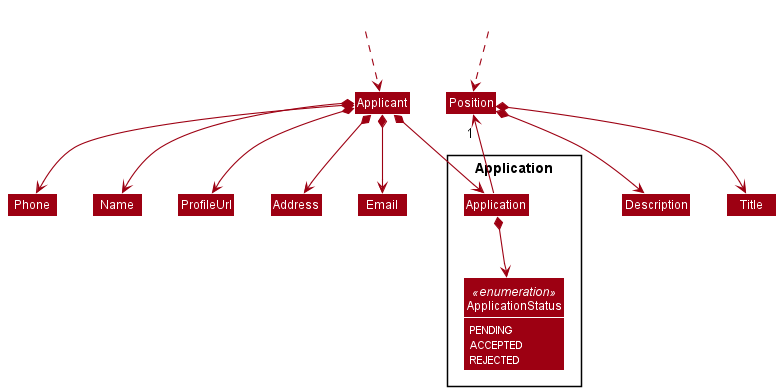
Applicants are:
- Uniquely identified by their
Name, i.e.UniqueApplicantListmaintains the uniqueness of its members by performingNamecomparisons.- Additionally,
Namecomparisons are performed on a case-insensitive basis.
Rationale:John Doeis likely to be the same person asjohn doeorJOHN DOE; thus, case-insensitiveNamecomparison is more user-friendly (as users cannot be expected to be case-correct all the time).
- Additionally,
- Indirectly associated to
PositionviaApplication.
Positions are:
- Uniquely identified by their
Title, in a similar fashion toApplicant.-
Titlecomparisons are also case-insensitive, for the same reasons as above.
-
- Indirectly associated to
ApplicantviaApplication.
The Application class:
- Encapsulates the ‘job application’ relationship between
ApplicantandPosition. - The
Positionfield must exist; i.e. is non-null.- If a
Positionis deleted, allApplications referencing it, as well as their correspondingApplicants, are deleted as well.
- If a
Storage component
API : Storage.java
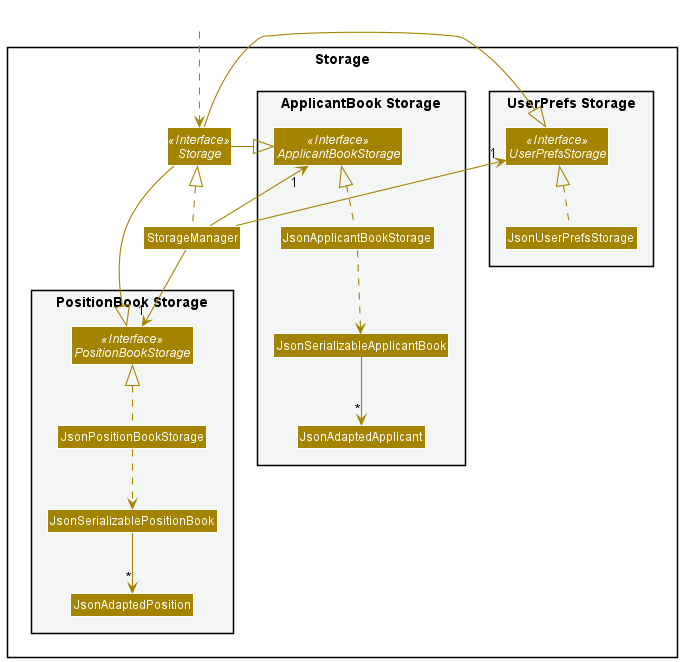
The Storage component,
- can save both applicant book data, position book data and user preference data in json format, and read them back into corresponding objects.
- inherits from
ApplicantBookStorage,PositionBookStorageand alsoUserPrefStorage, which means it can be treated as either one (if only the functionality of only one is needed). - depends on some classes in the
Modelcomponent (because theStoragecomponent’s job is to save/retrieve objects that belong to theModel)
Common classes
Classes used by multiple components are in the seedu.address.commons package.
Implementation
This section describes some noteworthy details on how certain features are implemented.
Note:
- All commands that modify the
ApplicantBookorPositionBookwill keep track of the state of the model before the modification usingmemento. -
Mementocaptures the existing model and success message from a command and stands by in the event of anundoscenario. -
All such commands will have a
 symbol beside it. Others will have no symbol displayed beside it.
 - Such commands include
add-applicant,add-position,delete-applicant,delete-position,edit-applicant,edit-position, andmark.
Add applicant feature
The implementation of the add applicant feature is achieved by the AddApplicantCommand class. Just like all other
commands in MTR, it extends the Command class. The most important attribute that it has, is the ApplicantParticulars
attribute, which contains all the details of the applicant (Name, Phone, Email, Address,
Title of Position being applied to, GithubLink), parsed straight from the user input.
The AddApplicantCommand#execute(Model model) method will use guard clauses to check whether there is a duplicate
applicant, and whether the position (that this applicant is applying to) input by the user actually exists in
PositionBook. If all parameters are valid, the ApplicantParticulars will then be passed to Model to add to
ApplicantBook, using the Model#addApplicantWithParticulars() method.
Given below is an example usage scenario and how the add applicant feature behaves at each step. Preconditions: The app is already launched and the appropriate position that the new applicant is applying to already exist.
Step 1. The user inputs the command add-applicant n/John Doe p/98765432 e/johnd@example.com a/John street,
block 123, #01-01 pos/software engineer github/https://github.com/johndoe. The app parser will store all the user-input parameters into an
ApplicantParticulars object, and return the AddApplicantCommand instance.
The following sequence diagram shows the method invocation in this step:
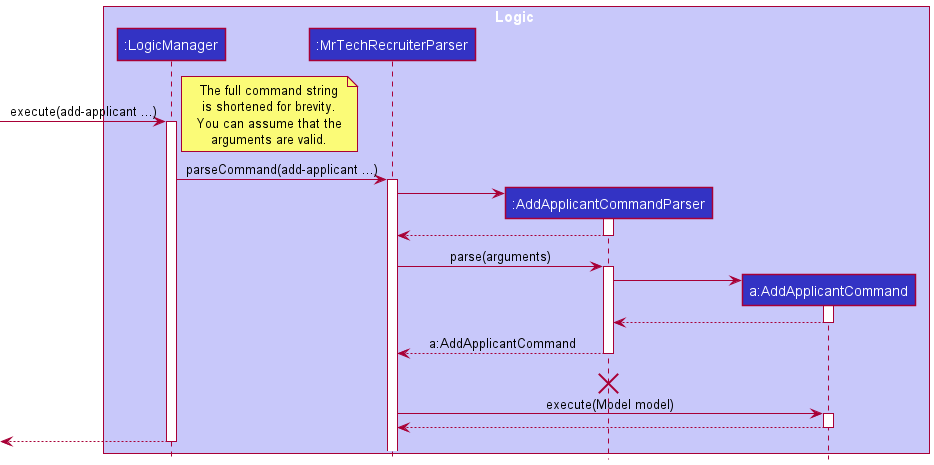
Step 2. LogicManager will execute this AddApplicantCommand instance. This will invoke the
Model#addApplicantWithParticulars() method.
Step 3. Here, we will retrieve the Position object from PositionBook if the position exists, using the Title that the user
input as argument, and create a new Applicant instance using the ApplicantParticulars and Position objects. Then we will add it to the ApplicantBook.
Note: If any of the guard clauses fail, i.e. the
applicant already exist, or the position does not exist, an appropriate exception will be thrown and the applicant
will not be created.
The following activity diagram summarizes the actions taken when LogicManager executes the AddApplicantCommand:
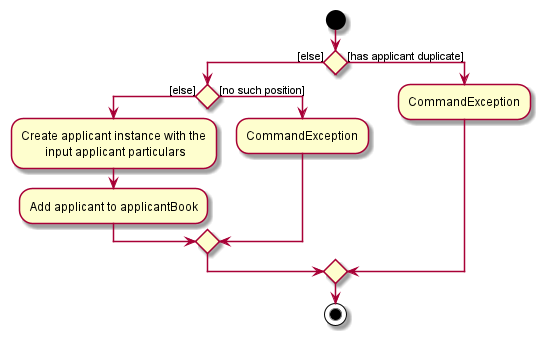
Design considerations:
Aspect: How and when the new applicant instance is created:
-
Alternative 1 (current choice): Saves all the user input as an
ApplicantParticularsobject.- Pros: Avoids the unnecessary clutter of passing multiple parameters to multiple method calls.
- Cons: May have lead to greater coupling among classes.
-
Alternative 2: Each user input parameter (e.g. Name, Address, Title etc.) are passed to multiple method calls.
- Pros: Will reduce the usage of a new class, thereby reducing coupling.
- Cons: This could lead to longer method signatures, longer code, and possibly a less OOP approach.
Delete applicant feature
Implementation
The delete-applicant feature is achieved by the DeleteApplicantCommand class. Just like all other
commands in MTR, it extends the Command class. The only parameter it takes in is the index position of the applicant in the ApplicantBook.
The DeleteApplicantCommand#execute(Model model) method will use the Model#getFilteredApplicantList() to indirectly
check whether the applicant exists by checking the size of the list against the index provided. The applicant to be deleted is then
obtained from the list via the standard List#get() and is removed from the model via Model#deleteApplicant().
Given below is an example usage scenario and how the delete applicant feature behaves at each step. Preconditions: The app is already launched and there is an applicant existing in MTR.
Step 1: The user inputs the command delete-applicant 1. The app parser simply parses the index 1 and returns the DeleteApplicantCommand instance.
Step 2: LogicManager executes this DeleteApplicantCommand instance, invoking the Model#deleteApplicant() method.
Step 3: This then calls the internal method for ApplicantBook, ApplicantBook#removeApplicant(), which then removes the applicant thereafter.
Edit applicant feature
Implementation
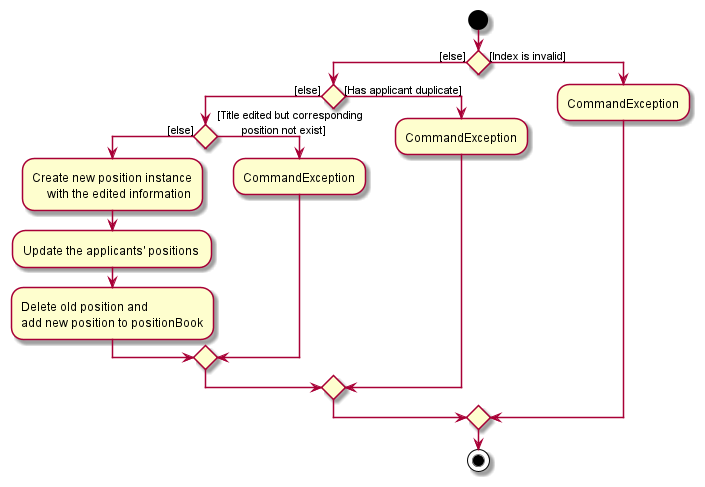
The implementation of the edit applicant feature uses the EditApplicantCommand class. A unique attribute for this
class is that the user can simply edit any number of fields or attributes to a particular applicant, with at least 1 field being changed.
The EditApplicantCommand method takes in an index and description of the target applicant with the help of the EditApplicantDescriptor class.
It then checks if the input index is valid by comparing it to the size of the current applicant list in MTR, as well as ensuring it is a positive integer.
It also has guard clauses verifying that the description has a valid Title which is a valid position title in the current positionBook. A final check is done to check that the applicant
with the new description is not already existing in MTR. Once these criteria are met, the model then updates the target applicant with the new description via the
Model#setApplicant() and Model#updateFilteredApplicantList() methods.
Given below is an example usage scenario and how the edit applicant feature behaves at each step.
Preconditions: The app is already launched, the target applicant exists.
Step 1. User inputs command edit-applicant 1 n/Jasmine Doe p/98761432 e/jdoe@example.com. The app parser will store
all the user-input parameters into an EditApplicantDescriptor object.
Step 2. LogicManager executes this EditApplicantCommand instance, invoking the EditApplicantDescriptor#createEditedApplicant() method to create a new Applicant to replace the original one.
Step 3. The model then replace the existing applicant with the new one in the applicantBook via Model#setApplicant() and reflect the updated list in the UI.
The following activity diagram summarizes the actions taken when LogicManager executes the EditApplicantCommand:
Mark/update applicant’s status feature
Implementation
This feature is achieved using the MarkApplicantStatusCommand class.
It is a simple command similar in functionality to the ‘Edit applicant’ feature, but streamlined for updating application statuses.
Note: There are currently only 3 states for applicants: Accepted, Rejected and Pending. These are described in the Applicant.ApplicationStatus enum.
The MarkApplicantStatusCommand#execute() first confirms the existence of the target applicant to be marked using guard clauses.
If the applicant exists, the applicant is updated with the new application status and the model replaces this applicant.
Given below is an example usage scenario of the mark applicant feature.
Preconditions: Applicant exists in MTR and a valid status is specified.
Step 1. User inputs mark john doe status/rejected. The app parser stores the target applicant name and new ApplicationStatus internally in the MarkApplicantStatusCommand as private fields.
Step 2. LogicManager executes this MarkApplicantStatusCommand instance, invoking the Applicant#markAs() method and Model#setApplicant() method, which creates a new applicant and replaces the existing applicant with the created one.
Step 3. In the UI, the applicant should now appear with the updated application status.
The following activity diagram summarizes the actions taken when LogicManager executes the MarkApplicantStatusCommand:
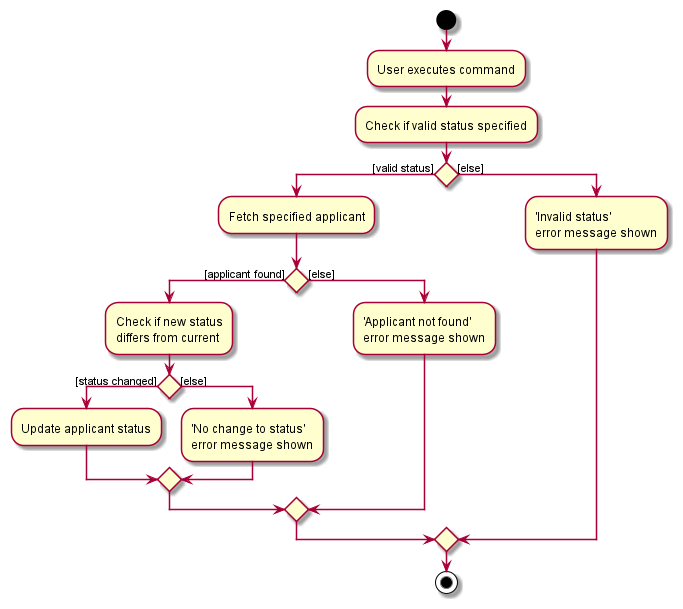
Design considerations:
Aspect: Integration or separation with the ‘Edit Applicant’ feature
-
Alternative 1 (current choice): Separate updating of applicant statuses into its own command
- Pros: More streamlined command for ease of use
- Our target users are likely to update applicant statuses a with must higher frequency than information like e-mails, addresses etc. Hence, having a dedicated, shorter command streamlines the user workflow.
- Cons: Additional command increases complexity, harder to maintain.
- Pros: More streamlined command for ease of use
-
Alternative 2: Integrate updating of applicant statuses into ‘Edit Applicant’ command
- Pros: Fewer commands for user to remember, also easier for developer to maintain.
- Cons: More troublesome to quickly update applicant statuses.
Filter applicants feature
Implementation
The filter feature is achieved using the functionality of the FilteredList class built into JavaFX, which filters its contents based on a specified Predicate.
This Predicate is constructed from the filters specified by the user whenever the filter-applicant command is called.
Note: This command is used for filtering applicants by Position and ApplicationStatus only, not to be confused with FindApplicantCommand, which searches by ‘Name’, and has slightly different matching criteria.
Design considerations:
Given below is a trace of the command’s execution. In particular, we first examine the parsing of user input into a FilterApplicantCommand object.
The process is described by the following sequence diagram:
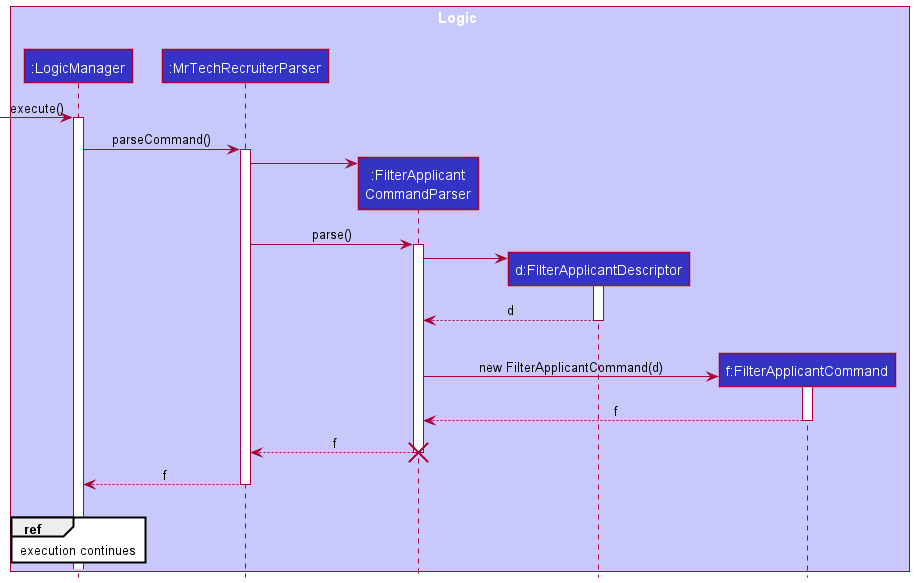
The role of the FilterApplicantDescriptor class is to store the details of the parsed filters for the Model component’s use, when the FilterApplicantCommand is subsequently executed.
The execution of the FilterApplicantCommand is shown below in a sequence diagram (as a continuation of the diagram above):
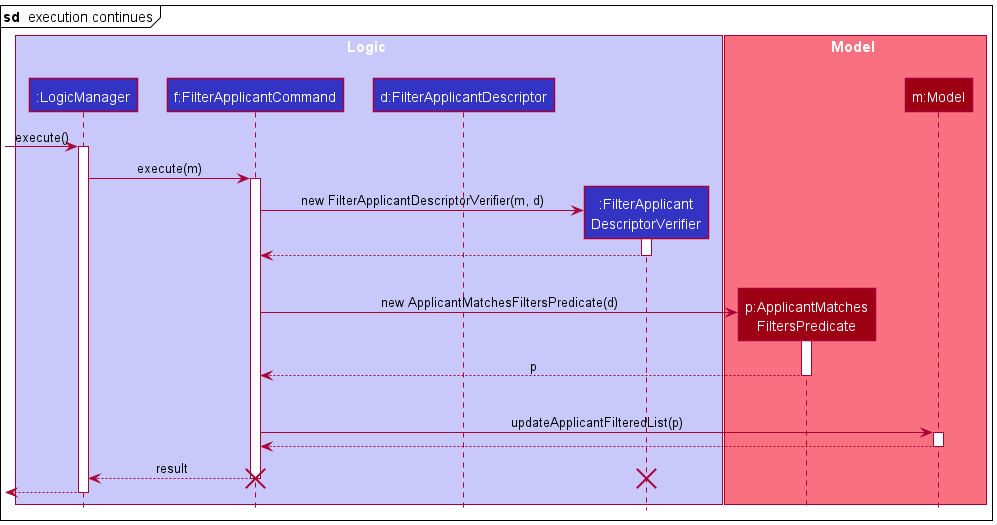
The FilterApplicantDescriptorVerifier class verifies the
original FilterApplicantDescriptor against the Model,
to ensure the validity of the filters specified by the user.
The (verified) FilterApplicantDescriptor is then passed to a call to ApplicantMatchesFiltersPredicate#new, which takes the filters and constructs a Predicate that evaluates to true only for an Applicant that passes all the filters, i.e. the filtering is performed with a logical AND.
The ApplicantMatchesFilterPredicate is then passed to a call to Model#updateApplicantFilteredList(), where JavaFX’s internal FilteredList functionality takes over and handles the filtering of the applicant list.
Note: The FilterApplicantDescriptor is not marked for deletion when the command finishes execution, as it is used by the command result to display a success message to the user.
Rationale for implementation
The Descriptor pattern (used similarly in features such as ‘Edit Applicant’) comes in handy whenever a command accepts a variable number of arguments & unspecified arguments are assumed to be ignored. For instance, the ‘Edit Applicant’ feature accepts a variable number of fields to be edited, and leaves all unspecified fields unedited.
The filter feature fits such a description, as the user should be able to specify a variable number of filtering criteria, and unspecified criteria should be left out of the filter. Hence, the pattern is implemented here in FilterApplicantDescriptor, which is used to construct the Predicate. It is also used in FilterApplicantDescriptorVerifier, to verify a variable number of filters.
Design considerations:
Aspect: Filtering the applicant list
-
Alternative 1 (current choice): Filtering the Applicant list via the FilteredList API :
- Pros: Well-defined behaviour when working through the API
- Cons: More complex filtering operations are harder to achieve, as we are restricted by the operations defined by the API.
-
Alternative 2: Manually manipulating the ApplicantList (e.g. using the Java Stream API)
- Pros: Greater flexibility; do not have to rely on constructing predicates and passing them to FilteredList.
- Cons: Directly manipulating the internal list breaks the abstraction provided by the FilteredList API, which can cause bugs.
Aspect: Reusing ‘Descriptor’ pattern from AB3’s ‘EditPersonDescriptor’
-
Alternative 1 (current choice): Reusing ‘Descriptor’ pattern
- Pros: Well-documented, pre-existing class that can be adapted to suit current usecase; time saved
- Cons: Less customized solution (e.g a user might wish to specify multiple criteria for a particular filter, or switch to a logical
ORfilter instead, in which case theDescriptorpattern is insufficient to fulfill such functionality).
-
Alternative 2: Delegate the responsibility of constructing Predicates to a new class
- Pros: Greater customizability in specifying different types of filters
- Cons: The class needs to be written from the ground up - this will cause greater complexity & take more time. Tests will need to be written from the ground up as well to accommodate the behaviour of the new class.
Find applicants feature
Implementation
The find feature is achieved using the functionality of the FilteredList class built into JavaFX,
which finds all applicants based on a specified name. This name is constructed via the NameContainsKeywordsPredicate class whenever the find-applicant command is called.
The FindApplicantCommand#execute() method does not have guard clauses to check that the given name is valid. It simply maps via the FindApplicantCommand#applicantMatchesFilter()
method to find all applicants matching the given name. A new filtered list is now displayed on the MTR UI. Hence, an empty list may be displayed on the UI.
Note: This command is used for finding applicants by their Name only, not to be confused with FilterApplicantCommand.
Given below is an example usage scenario of the find applicant feature.
Preconditions: Applicant exists in MTR and valid filters provided.
Step 1. User inputs command find-applicant John. The app parser stores all information in a new NameContainsKeywordsPredicate instance.
Step 2. Model executes FindApplicantCommand#execute() method, invoking the Model#updateFilteredApplicantList() method, mapping all applicants to check if they have the same name.
Step 3. Results of this new filtered list is then passed to the model and is reflected onto the UI.
Design considerations:
Aspect: Finding via name
-
Alternative 1 (current choice): Separating searching of name from positions and statuses.
- Pros: Because of the way we implemented, it is much easier to search via name rather than positions or statuses. Also reduces coupling on the
FilterApplicantCommandclass and easier to test. - Cons: Might result in slight confusion for users due to 2 similarly-named commands.
- Pros: Because of the way we implemented, it is much easier to search via name rather than positions or statuses. Also reduces coupling on the
-
Alternative 2: Use the existing
FindCommandor createdFilterApplicantCommandand improve the command from there to achieve this functionality.- Pros: A singular class to handle all finding/filtering-related commands, making it easier for users.
- Cons: Very difficult to code since it requires integrating of multiple existing classes, resulting in potentially many bugs and complicated logic.
Mark/update applicant’s status feature
Implementation
This feature is achieved using the MarkApplicantStatusCommand class.
It is a simple command similar in functionality to the ‘Edit applicant’ feature, but streamlined for updating application statuses.
Note: There are currently only 3 states for applicants: Accepted, Rejected and Pending. These are described in the Applicant.ApplicationStatus enum.
The MarkApplicantStatusCommand#execute() first confirms the existence of the target applicant to be marked using guard clauses.
If the applicant exists, the applicant is updated with the new application status and the model replaces this applicant.
Given below is an example usage scenario of the mark applicant feature.
Preconditions: Applicant exists in MTR and valid mark status given.
Step 1. User inputs mark john doe status/rejected. The app parser stores the target applicant name and new ApplicationStatus internally in the MarkApplicantStatusCommand as private fields.
Step 2. LogicManager executes this MarkApplicantStatusCommand instance, invoking the Applicant#markAs() method and Model#setApplicant() method, which creates a new applicant and replaces the existing applicant with the created one.
Step 3. In the UI, the applicant should now appear with the updated application status.
The following activity diagram summarizes the actions taken when LogicManager executes the MarkApplicantStatusCommand:
Design considerations:
Aspect: Integration or separation with the ‘Edit Applicant’ feature
-
Alternative 1 (current choice): Separate updating of applicant statuses into its own command
- Pros: More streamlined command for ease of use
- Our target user (Tech recruiters) are likely to update applicant statuses a with must higher frequency than information like e-mails, addresses etc. Hence, having a dedicated, shorter command streamlines the user workflow.
- Cons: Additional command increases complexity, harder to maintain.
- Pros: More streamlined command for ease of use
-
Alternative 2: Integrate updating of applicant statuses into ‘Edit Applicant’ command
- Pros: Fewer commands for user to remember, also easier for developer to maintain.
- Cons: More troublesome to quickly update applicant statuses.
List applicants feature
Implementation
The list applicants feature is achieved by the ListApplicantCommand class. Unlike most other commands in the MTR,
it only has 1 action under the ListApplicantCommand#execute() method besides creation of the command itself, which is
Model#updateFilteredApplicantList() which updates the UI to show all current applicants in the ApplicantBook.
If there are no current applicants in the ApplicantBook, the UI should appear empty.
Given below is an example usage scenario of the mark applicant feature.
Preconditions: MTR has started up and is working.
Step 1. User inputs list-applicant.
Step 2. LogicManager executes this ListApplicantCommand instance, invoking the Model#updateFilteredApplicantList().
Step 3. The UI is updated to show the current list of applicants.
Design considerations:
Aspect: Listing applicants
-
Alternative 1 (current choice): Create a separate command from the original AB3, but follow a similar style.
- Pros: Better understanding of underlying code and how everything comes together.
- Cons: More time-consuming.
-
Alternative 2: Use existing
listcommand in AB3 and adapt for MTR.- Pros: Many functions already in place and little modification is required.
- Cons: Although less code to be added, due to coupling, more things are needed to be changed intricately and carefully (i.e. prone to errors/bugs).
Add position feature
Implementation
The implementation of the add position feature is achieved by the AddPositionCommand class. There are 2 things parsed
straight from the user input: The position Title and the Description. A slight difference from the AddApplicantCommand
is that no separate class is used here - the Position class simply creates a new instance directly.
The AddPositionCommand#execute(Model model) method will use guard clauses to check whether there is a duplicate
position in PositionBook. If valid, the new position will then be passed to Model to add to
PositionBook, using the Model#addPosition() method.
Given below is an example usage scenario and how the add position feature behaves at each step. Preconditions: The app is already launched and the position to be added is new to MTR.
Step 1. The user inputs the command add-position tit/software engineer des/work in a team that builds a facial recognition application.
The app parser will store all the user-input parameters into a new Position instance.
Step 2. LogicManager executes this AddPositionCommand instance, invoking the Model#addPosition() method.
Step 3. The UI for PositionBook will now contain the new position added.
Design considerations:
Aspect: Adding positions
-
Alternative 1 (current choice): Have a singular
Positionclass to handle all position related methods.- Pros: Simplifies coding and testing since everything is parked under 1 class.
- Cons: Higher coupling for the
Positionclass.
-
Alternative 2: Have a separate class which contains details of various positions like applicants.
- Pros: Separates details from the actual class.
- Cons: Unnecessary since positions have few fields and functions, additional class simply increases complexity. Defeats the purpose of the
Positionclass.
Delete position feature
Implementation
The delete position feature is achieved by the DeletePositionCommand class, in similar flavour to the DeleteApplicantCommand.
The only parameter it takes in is the index position of the position in the PositionBook.
The DeletePositionCommand#execute(Model model) method will use the Model#getFilteredPositionList() to indirectly
check whether the position exists by checking the size of the list against the index provided. The position to be deleted is then
obtained from the list via the standard List#get() and is removed from the model via Model#deletePosition().
When a position is deleted, the applicants applying to the position are also deleted.
Given below is an example usage scenario and how the delete position feature behaves at each step. Preconditions: The app is already launched and there is a position existing in MTR.
Step 1: The user inputs the command delete-position 1. The app parser simply parses the index 1 and returns the DeletePositionCommand instance.
Step 2: LogicManager executes this DeletePositionCommand instance, invoking the Model#deletePosition() method.
Step 3: This then calls the internal method for PositionBook, PositionBook#removeApplicant() and ApplicantBook#removeApplicantsUnderPosition(),
which then removes the position and related applicants.
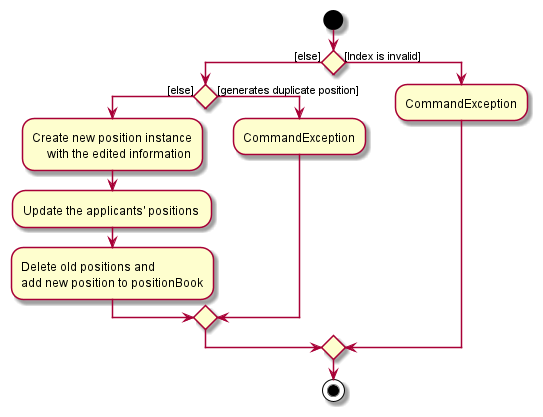
Edit position feature
Implementation
The implementation of the edit position feature uses the EditPositionCommand class, in similar flavour to the EditApplicantCommand. A unique attribute for this
class is that the user can simply edit any number of fields or attributes to a particular applicant, with at least 1 field being changed.
The EditPositionCommand method takes in an index and description (including Title) of the target position with the help of the EditPositionDescriptor class.
It then checks if the input index is valid by comparing it to the size of the current applicant list in MTR, as well as ensuring it is a positive integer.
It also has guard clauses verifying that the description is valid and different from the one in the MTR. Once these criteria are met,
the model then updates the target position with the new description via the Model#setPosition() and Model#updateFilteredPositionList() methods.
It also ensures all applicant’s positions are updated using the Model#updateApplicantsWithPosition().
Given below is an example usage scenario and how the edit position feature behaves at each step.
Preconditions: The app is already launched, the target position exists.
Step 1. User inputs command edit-position 1 tit/Algorithm Engineer des/embed algorithms into the facial recognition application . The app parser will store
all the user-input parameters into an EditPositionDescriptor object.
Step 2. LogicManager executes this EditPositionCommand instance, invoking the EditPositionDescriptor#createEditedPosition() method to create a new Position to replace the original one.
Step 3. The model then replaces the existing position with the new one in the PositionBook via Model#setPosition() and reflects the updated list in the UI.
The following activity diagram summarizes the actions taken when LogicManager executes the EditPositionCommand:
List positions feature
Implementation
The list positions feature is achieved by the ListPositionCommand class. Unlike most other commands in the MTR,
it only has 1 action under the ListPositionCommand#execute method besides creation of the command itself, which is
Model#updateFilteredPositionList which updates the UI to show all current positions in the PositionBook.
If there are no current positions in the PositionBook, the UI should appear empty.
Given below is an example usage scenario of the mark applicant feature.
Preconditions: MTR has started up and is working.
Step 1. User inputs list-position.
Step 2. LogicManager executes this ListPositionCommand instance, invoking the Model#updateFilteredPositionList().
Step 3. The UI is updated to show the current list of positions.
Design considerations:
Aspect: Listing positions
-
Alternative 1 (current choice): Create a separate command from the original AB3, but follow a similar style.
- Pros: Better understanding of underlying code and how everything comes together.
- Cons: More time-consuming.
-
Alternative 2: Use existing
listcommand in AB3 and adapt for MTR.- Pros: Many functions already in place and little modification is required.
- Cons: Due to coupling, requires changing code intricately and carefully (i.e. prone to errors/bugs).
Rejection Rate feature
Proposed Implementation
The proposed rejection rate mechanism is facilitated by Model and Calculator.
The Model component checks if the position exists and accesses it, while Calculator calculates the rejection rate (if applicable).
Implements the following functions:
-
ModelManager#hasPositionWithTitle()— Checks if a position with a given title exists in the MTR. -
Calculator#calculateRejectionRate()— Calculates the rejection rate of a position based on the number of total applicants and number of rejected applicants for that position.
These operations are exposed in the Model interface as Model#hasPositionWithTitle() and Model#calculateRejectionRate() respectively.
Given below is an example usage scenario and how the rejection rate mechanism works at every step.
Preconditions: Position exists in MTR and there is at least 1 applicant for this position (regardless of status).
Step 1. The user launches the application which is assumed to have some positions and corresponding applicants applying for them in the MTR.
Step 2. The user executes rate pos/software engineer command to calculate the rejection rate of Software Engineer in the PositionBook.
The rate command calls Model#hasPositionWithTitle(), causing the model to check whether Software Engineer exists in the database as a Position.
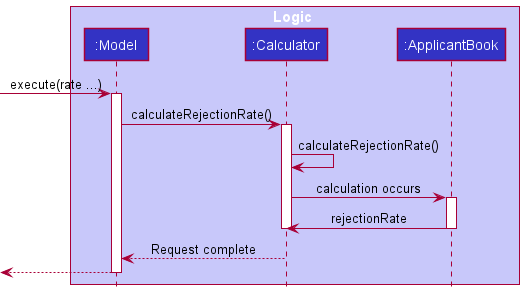
Step 3. If the position exists, it will access the ApplicantBook via Model#calculateRejectionRate(), beginning a count of the number of applicants for the position as well as the number of rejected applicants of the same position.
Step 4. After these numbers have been obtained, the Calculator class is called and calculates via Calculator#calculateRejectionRate(). This resulting floating point number is then the rejection rate of the position.
The following sequence diagram shows the method invocation in this step.
Step 5. Any command the user executes next simply refreshes the current state to its original state as shown in step 1.
Design considerations:
Aspect: How rejection rate executes:
-
Alternative 1 (current choice): Calculate the rejection rate only when needed. No storing required.
- Pros: Saves a significant amount of space and reduces immutability. Implementation is simple.
- Cons: A user could want to calculate many rejection rates frequently and hence not storing these values might have performance issues in the long run.
-
Alternative 2: Store all rejection rates with their respective positions in a dictionary.
- Pros: Accessing the rejection rates of a certain position will only require access to the dictionary and nothing else - limited accessibility. Also, accessing a rejection rate will be much quicker.
- Cons: Potentially a large amount of space required, slowing performance. Also, the dictionary needs to be updated everytime an applicant’s status changes or when a position/applicant is added/deleted, which could result in many inter-linked implementations for the dictionary, rendering it slow. May be difficult to show change in UI as well with many layers affected.
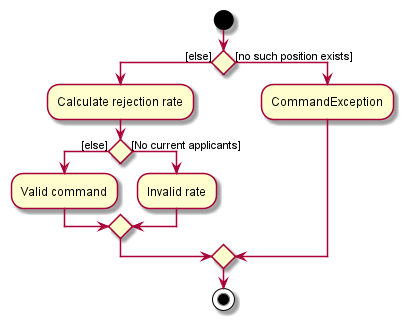
The following activity diagram summarizes the actions taken when LogicManager executes the RejectionRateCommand:
Visualize Positions feature
Implementation
This feature makes use of JavaFX’s built-in PieChart component, as well as the Tooltip component to display the percentages of each pie chart slice.
The following activity diagram describes the execution flow of the command:

Additionally, the following classes are responsible for generating and displaying the pie chart to the user:
-
PositionPieChart: A JavaFXPieChartsummarizing aPosition, and the application statuses of itsApplicants.- Contains logic to process a specified
Positionand a list ofApplicantsinto aPositionPieChart. - Does some additional post-processing like styling, and installing
Tooltipsto display pie chart percentages.
- Contains logic to process a specified
-
PieChartDisplayer: Takes in a JavaFXPieChartand displays it to the user in a new window.- The opened window is set to close when it loses focus, via the
setCloseOnLoseFocus()method.
- The opened window is set to close when it loses focus, via the
The following sequence diagram demonstrates this process:
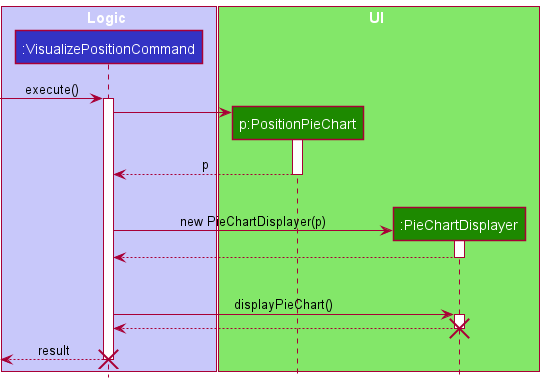
Note: The PositionPieChart is not marked for deletion when the command finishes execution, as it persists for as long as the user keeps the pie chart open.
Design Considerations
Aspect: Displaying of pie chart to user
-
Alternative 1 (current choice):
PieChartDisplayerclass.- Pros: Quick and easy to use, reusable.
- Cons: Lack of flexibility, limited choice in UI design.
-
Alternative 2: Full,
UiPartclass with FXML- Pros: Greater customizability, styling options.
- Cons: More complex, harder to maintain.
Undo feature
Implementation
The Memento Pattern is used to implement undo feature. The undo functionality is facilitated by Memento and History.
Every command keeps a Memento which stores the state of Model before any modification is done by a command.
The Model keeps track of the History which stores a stack of previous modification commands.
Given below is an example usage scenario and how the undo mechanism behaves at each step.
Step 1. The user launches the application. The History will be initialized with an empty command stack, and the model keeps track of the History.
Step 2. The user executes delete-applicant 3 command to delete the 3rd applicant in the applicant book. The delete-applicant command updates its Memento and calls Model#addToHistory(), causing the state of the Model before the modification to be saved in History.
Step 3. The user executes add-applicant n/David … to add a new applicant. The add-applicant command also updates its Memento and calls Model#addToHistory(), causing the state of the Model before the modification to be saved in History.
Note: If a modification command fails its execution, it will not call Model#addToHistory(), so the model state will not be saved into the History.
Step 4. The user now decides that adding the applicant was a mistake, and decides to undo that action by executing the undo command. The undo command will call Model#recoverHistory(), which will pop out the previous command from History, and restore the model in the Memento of the previous command.
Note: If the stack in the History is empty, then there are no previous model states to restore. The undo command uses Model#hasHistory() to check if this is the case. If so, it will return an error to the user rather
than attempting to perform the undo.
The following sequence diagram shows how the undo operation works:
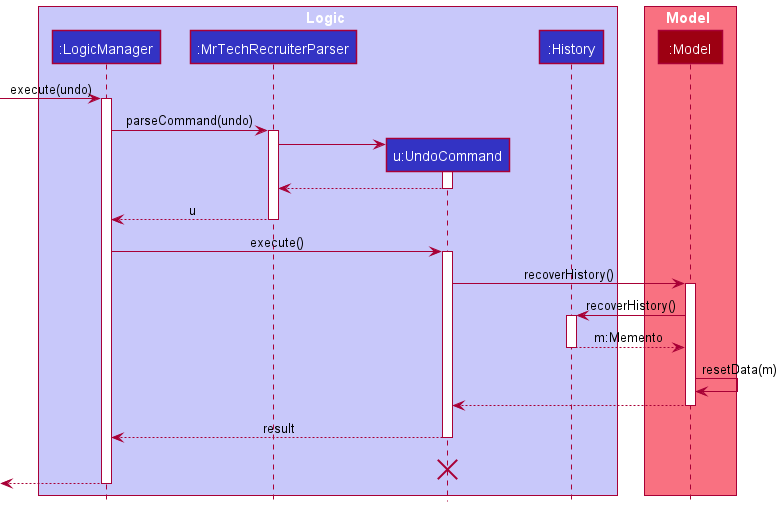
Note: The lifeline for UndoCommand should end at the destroy marker (X) but due to a limitation of PlantUML, the lifeline reaches the end of diagram.
The following activity diagram summarizes what happens when a user executes a new command:
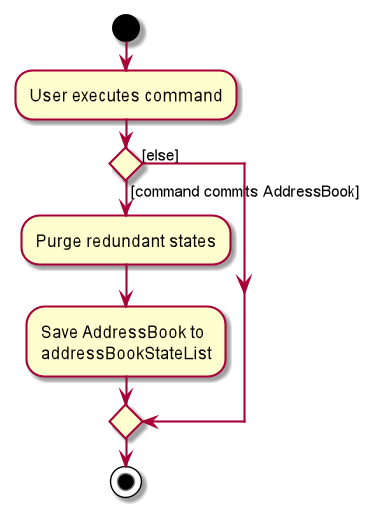
Design considerations:
Aspect: How undo executes:
-
Alternative 1 (current choice): Saves the entire model.
- Pros: Easy to implement.
- Cons: May have performance issues in terms of memory usage.
-
Alternative 2: Individual command knows how to undo by
itself.
- Pros: Will use less memory (e.g. for
delete-position, just save the position and applicants being deleted). - Cons: It is time-consuming to ensure that the implementation of each individual command are correct. Since there are many interactions between
PositionandApplicant, the undo logic could become complicated.
- Pros: Will use less memory (e.g. for
Documentation, logging, testing, configuration, dev-ops
Appendix: Requirements
Product scope
Target user profile:
This product is for HR departments of tech companies that have a large number of applicants and complicated recruitment processes.
Additionally, the user:
- has a need to manage a significant number of applicants
- Needs to quickly search for an applicant using its name
- Needs to quickly search for the list of applicants from the position that they are applying to
- Needs to quickly search for the list of applicants with a particular application status
- Want to view the rejection rates of the various positions so that they can gain insights on which positions are most competitive
- prefer desktop apps over other types
- can type fast
- prefers typing to mouse interactions
- is reasonably comfortable using CLI apps
Value proposition:
An efficient applicant management system for HR departments of technology companies to track application statuses and store applicant information.
User stories
Priorities: High (must have) - * * *, Medium (nice to have) - * *, Low (unlikely to have) - *
| Priority | As a … | I want to … | So that I can… |
|---|---|---|---|
* * * |
general user | add new job positions | Add applicants to these positions. |
* * * |
general user | delete existing job positions | Remove irrelevant, out-of-date jobs. |
* * * |
general user | edit existing job positions | update the position name and description according to my company’s changes. |
* * * |
general user | see the current list of positions | have a quick overview of current positions in the company. |
* * * |
general user | add a new applicant under a position | Store his/her information within the system. |
* * * |
general user | delete an applicant from under a position | Remove applicants that are no longer related to this position. |
* * * |
general user | edit existing applicants | update the applicant’s name and relevant information accordingly. |
* * * |
general user | find applicants based on their name, position or application status | compare applicants’ relevant information. |
* * * |
general user | update applicants’ application statuses directly | quickly update and see positions’ competitiveness. |
* * * |
general user | see the current list of applicants | have a quick overview of applicants that have applied to the various positions. |
* * * |
general user | view the average rejection rates of all job positions | gauge how competitive a position might be. |
* * * |
general user | visualize the number of applicants in job positions | gauge how popular a position might be. |
* * * |
new user | see usage instructions | refer to instructions when I forget how to use the App. |
* * |
user | hide private applicant details | ensure confidentiality of applicants’ information. |
* * |
user | undo my last command/action | retract mistakes or changes made in the command. |
* |
user with many applicants in the address book | sort applicants by name | locate an applicant easily. |
* |
user | see a graphical representation of statuses in a position | have a quick visualisation on how competitive a position might be. |
Use cases
(For all use cases below, the System is MrTechRecruiter and the Actor is the user, unless specified otherwise.)
Use Case: UC1 - Add a new position
Preconditions: NA
Guarantees: New position is saved with information displayed.
MSS:
- User requests to add a new position, with necessary details.
- MrTechRecruiter adds the new position and shows a success message.
Use case ends.
Extensions:
- 1a. The format is invalid.
- 1a1. MrTechRecruiter shows an error message for invalid format.
Use case ends.
- 1a1. MrTechRecruiter shows an error message for invalid format.
- 1b. The position already exists in MTR.
- 1b1. MrTechRecruiter shows an error message for duplicate position.
Use case ends.
- 1b1. MrTechRecruiter shows an error message for duplicate position.
Use Case: UC2 - Delete a position
Preconditions: The specified position exists.
Guarantees: Position and applicants applying to the position are deleted from MTR and display is updated.
MSS:
- User requests to delete a position via index.
- MrTechRecruiter deletes the existing position from the position book and shows a success message.
- All applicants with this existing position will also be consequently deleted.
Use case ends.
Extensions:
- 1a. The format provided is invalid or the index is negative.
- 1a1. MrTechRecruiter shows an error message for invalid format.
Use case ends.
- 1a1. MrTechRecruiter shows an error message for invalid format.
- 1b. The index provided is larger than the number of displayed positions.
- 1b1. MrTechRecruiter displays a message that there are no current positions.
Use case ends.
- 1b1. MrTechRecruiter displays a message that there are no current positions.
Use Case: UC3 - Edit a position
Preconditions: The specified position exists.
Guarantees: Position in MTR is changed and display is updated.
MSS:
- User requests to edit a position via index, providing a new title and new description.
- MrTechRecruiter updates the existing position in the position book and shows a success message.
Use case ends.
Extensions:
- 1a. The index provided is invalid (negative or larger than positionBook size)
- 1a1. MrTechRecruiter shows an error message for invalid format.
Use case ends.
- 1a1. MrTechRecruiter shows an error message for invalid format.
- 1b. The position book is empty.
- 1b1. MrTechRecruiter displays a message that no position is in the list.
Use case ends.
- 1b1. MrTechRecruiter displays a message that no position is in the list.
- 1c. Title provided or description provided is invalid.
- 1c1. MrTechRecruiter shows an error message for invalid format.
Use case ends.
- 1c1. MrTechRecruiter shows an error message for invalid format.
- 1d. The position to be changed has the same title and description.
- 1d1. MrTechRecruiter shows an error message saying that the edited position is the same.
Use case ends.
- 1d1. MrTechRecruiter shows an error message saying that the edited position is the same.
Use Case: UC4 - Add a new applicant
Preconditions: NA
Guarantees: Applicant is added to MTR and display is updated.
MSS:
- User requests to add a new applicant and provides all the necessary parameters/details.
- MrTechRecruiter adds the new applicant and shows a success message.
Use case ends.
Extensions:
- 1a. The format is invalid.
- 1a1. MrTechRecruiter shows an error message for invalid format.
Use case ends.
- 1a1. MrTechRecruiter shows an error message for invalid format.
- 1b. The applicant to be added already exists in MrTechRecruiter.
- 1b1. MrTechRecruiter shows an error message indicating duplicate applicant.
Use case ends.
- 1b1. MrTechRecruiter shows an error message indicating duplicate applicant.
- 1c. The position specified in parameters does not exist in MTR.
- 1c1. MrTechRecruiter shows an error message indicating that position does not exist.
Use Case: UC5 - Delete an applicant
Preconditions: NA
Guarantees: Applicant is deleted from MTR and display is updated.
MSS
- User requests to delete an applicant via index.
- MrTechRecruiter deletes specified applicant in the list and UI updated to not show the deleted applicant.
Use case ends.
Extensions
- 1a. The index provided is invalid (out of bounds).
- 1a1. MrTechRecruiter shows an error message for invalid format.
Use case ends.
- 1a1. MrTechRecruiter shows an error message for invalid format.
- 1b. There are no applicants in the MrTechRecruiter.
- 1b1. MrTechRecruiter displays a message that there is currently no applicants.
Use case ends.
- 1b1. MrTechRecruiter displays a message that there is currently no applicants.
Use Case: UC6 - Edit a new applicant
Preconditions: NA
Guarantees: Applicant in MTR is edited and display is updated.
MSS:
- User requests to edit an applicant via index, giving the updated details.
- MrTechRecruiter updates the existing applicant and shows a success message.
- The UI will also be updated to show the applicant’s new details.
Use case ends.
Extensions:
- 1a. The index provided is invalid (negative or larger than applicantBook size)
- 1a1. MrTechRecruiter shows an error message for invalid format.
Use case ends.
- 1a1. MrTechRecruiter shows an error message for invalid format.
- 1b. The Applicant book is empty.
- 1b1. MrTechRecruiter displays a message that there is currently no applicants.
Use case ends.
- 1b1. MrTechRecruiter displays a message that there is currently no applicants.
- 1c. Any new details provided is invalid.
- 1c1. MrTechRecruiter shows an error message for invalid format.
Use case ends.
- 1c1. MrTechRecruiter shows an error message for invalid format.
- 1d. The applicant to be changed has the same description overall.
- 1d1. MrTechRecruiter shows an error message saying that the edited applicant is the same.
Use case ends.
- 1d1. MrTechRecruiter shows an error message saying that the edited applicant is the same.
- 1e. The position specified in parameters does not exist in MTR.
- 1e1. MrTechRecruiter shows an error message indicating that position does not exist.
Use Case: UC7 - Listing current positions
Preconditions: NA
Guarantees: NA
MSS:
- User requests to view all current positions.
- MrTechRecruiter refreshes the UI and reflects all existing positions.
Use case ends.
Use Case: UC8 - Listing current applicants
Preconditions: NA
Guarantees: NA
MSS:
- User requests to view all current applicants.
- MrTechRecruiter refreshes the UI and reflects all existing applicants.
Use case ends.
Use Case: UC9 - Finding applicants by name
Preconditions: NA
Guarantees: NA
MSS:
- User requests to find all applicants containing a specified name.
- MrTechRecruiter searches through all applicants and returns a list of all applicants containing the name, displaying it in the UI.
Use case ends.
Extensions:
- 1a. Invalid name given by user.
- 1a1. MrTechRecruiter shows an error message indicating invalid name.
Use case ends.
- 1a1. MrTechRecruiter shows an error message indicating invalid name.
- 1b. No applicants contain the specified name.
- 1b1. MrTechRecruiter shows a message indicating no applicants matched the given search.
Use case ends.
- 1b1. MrTechRecruiter shows a message indicating no applicants matched the given search.
Use Case: UC10 - Finding applicants by position
Preconditions: NA
Guarantees: NA
MSS:
- User requests to find all applicants that applied to a specific position.
- MrTechRecruiter searches through all applicants and returns a list of all applicants who applied to the position, displaying it in the UI.
Use case ends.
Extensions:
- 1a. Invalid position name given by user.
- 1a1. MrTechRecruiter shows an error message indicating invalid position name.
Use case ends.
- 1a1. MrTechRecruiter shows an error message indicating invalid position name.
- 1b. No applicants have applied for that particular position.
- 1b1. MrTechRecruiter shows a message indicating no applicants have applied for the selected position.
Use case ends.
- 1b1. MrTechRecruiter shows a message indicating no applicants have applied for the selected position.
Use Case: UC11 - Finding applicants by application status
Preconditions: NA
Guarantees: NA
MSS:
- User requests to find all applicants with a specified application status.
- MrTechRecruiter searches through all applicants and retrieves all applicants with the specified application status, displaying it in the UI.
Use case ends.
Extensions:
- 1a. Invalid application status given by user.
- 1a1. MrTechRecruiter shows an error message indicating invalid application status.
Use case ends.
- 1a1. MrTechRecruiter shows an error message indicating invalid application status.
- 1b. No applicants have that particular application status.
- 1b1. MrTechRecruiter shows a message indicating no applicants have that current application status.
Use case ends.
- 1b1. MrTechRecruiter shows a message indicating no applicants have that current application status.
Use Case: UC12 - Update applicant's application status
Preconditions: NA
Guarantees: If updated, MTR will update and reflect the updated status.
MSS:
- User requests to update an applicant’s application status, giving the name and status.
- MrTechRecruiter replaces the existing applicant and updates the UI.
Use case ends.
Extensions:
- 1a. Invalid application status given by user.
- 1a1. MrTechRecruiter shows an error message indicating invalid parameters.
Use case ends.
- 1a1. MrTechRecruiter shows an error message indicating invalid parameters.
- 1b. Invalid name provided.
- 1b1. MrTechRecruiter shows an error message indicating invalid parameters.
Use case ends.
- 1b1. MrTechRecruiter shows an error message indicating invalid parameters.
- 1c. There are no applicants in MrTechRecruiter.
- 1c1. MrTechRecruiter displays a message indicating no such applicant.
Use case ends.
- 1c1. MrTechRecruiter displays a message indicating no such applicant.
Use case: UC13 - Viewing average rejection rates for a job position.
Preconditions: NA
Guarantees: NA
MSS:
- User requests to see the rejection rate of a particular position.
- MrTechRecruiter calculates and returns the rejection rate.
Use case ends.
Extensions:
- 1a. Invalid position name given
- 1a1. MrTechRecruiter shows an error message indicating invalid position name.
Use case ends.
- 1a1. MrTechRecruiter shows an error message indicating invalid position name.
- 1b. No current applicants for that position.
- 1b1. MrTechRecruiter displays a message indicating no current applicants for that position.
Use case ends.
- 1b1. MrTechRecruiter displays a message indicating no current applicants for that position.
Use case: UC14 - Viewing breakdown of statuses of a position.
Preconditions: NA
Guarantees: NA
MSS:
- User requests to see the breakdown of statuses of a particular position.
- MrTechRecruiter calculates and displays a pie chart showing distribution of current statuses of applicants for this position.
Use case ends.
Extensions:
- 1a. Invalid position name given
- 1a1. MrTechRecruiter shows an error message indicating invalid position name.
Use case ends.
- 1a1. MrTechRecruiter shows an error message indicating invalid position name.
- 1b. No current applicants for that position.
- 1b1. MrTechRecruiter displays a message indicating no current applicants for that position.
Use case ends.
- 1b1. MrTechRecruiter displays a message indicating no current applicants for that position.
Use case: U15 - Undoing a previous command.
Preconditions: User must have entered a command which modifies MrTechRecruiter’s data (adding, editing or deleting of positions/applicants)
Guarantees: MrTechRecruiter is restored to its previous state.
MSS:
- User requests to undo a previous command entered.
- MrTechRecruiter restores its state to before the last command entered.
- MrTechRecruiter displays all applicants and positions from before the last command entered.
Use case ends.
Extensions:
- 1a. No applicable commands have been entered previously (i.e. no adding, editing or deletion of positions or applicants has occurred).
- 1a1. MrTechRecruiter displays an error message indicating it cannot
undodue to no previous record.
Use case ends.
- 1a1. MrTechRecruiter displays an error message indicating it cannot
Use case: U16 - Requesting the help menu.
Preconditions: NA
Guarantees: Prompts opening of a window containing the link to our User Guide.
MSS:
- User requests for the help page.
- MrTechRecruiter automatically opens up a window containing the link to our User Guide.
Use case ends.
Extensions: NA
Use case: U17 - Exiting MrTechRecruiter.
Preconditions: NA
Guarantees: Saving of any current data in MrTechRecruiter before shutting down.
MSS:
- User requests to exit MrTechRecruiter.
- MrTechRecruiter does a final save before shutting down.
Use case ends.
Extensions: NA
Non-Functional Requirements
- Should work on any mainstream OS as long as it has Java
11or above installed. - Should be able to hold up to 1000 persons without a noticeable sluggishness in performance for typical usage.
- A user with above average typing speed for regular English text (i.e. not code, not system admin commands) should be able to accomplish most of the tasks faster using commands than using the mouse.
- A new user should be able to easily navigate through MrTechRecruiter and perform basic tasks (e.g. adding/deleting).
- Should be portable (i.e. work without requiring an installer).
- Should not depend on a remote server.
- Should work for standard (i.e. industry-standard Full HD 1080p resolution) screen resolutions and higher.
- Should be packaged into a single, compact (~100MB) file.
- Developer & User guides should be PDF friendly.
- The app should only read from the specified JSON file for persisted data.
Glossary
- Applicant: A potential hire that is applying for a particular job position.
-
Application Status / Status: Current application status of an applicant for a particular position. Can be
Accepted,RejectedorPending. - CLI: Command-line interface. CLI programs take in input in the form of text-based commands, usually input by the user, to execute the program’s various functions.
- Guarantees: Conditions that will be fulfilled after the use case ends.
- Job position: A job opening within the user’s company that is looking for potential hires.
- Mainstream OS: Windows, Linux, Unix, OS-X.
- MSS: Main Success Scenario, the usual steps and outcome of an actor and a use case.
- NA: Not Applicable.
- Preconditions: Conditions that have to be fulfilled before the use case begins.
- Private contact detail: A contact detail not meant to be circulated.
- Rejection rate: The percentage of jobs for a particular job position that was not accepted by the employee or employer.
-
Rejection rate calculation =
No. of rejected applicants for a position/Total no. of applicants applying to the position. - UC = Use Case.
Appendix: Instructions for manual testing
Given below are instructions to test the app manually.
Note: These instructions only provide a starting point for testers to work on;
testers are expected to do more exploratory testing.
Launch and shutdown
-
Initial launch
-
Download the jar file and copy into an empty folder
-
Double-click the jar file Expected: Shows the GUI with a set of sample contacts. The window size may not be optimum.
-
-
Saving window preferences
-
Resize the window to an optimum size. Move the window to a different location. Close the window.
-
Re-launch the app by double-clicking the jar file.
Expected: The most recent window size and location is retained.
-
Adding a new position
- Adding a position to MrTechRecruiter
- Prerequisites: -
- Test case:
add-position tit/tester des/test codes
Expected: The positiontesteris added to MTR. The detailed information is shown in the status message. - Test case (followed by the previous test case):
add-position tit/tester desc/testing
Expected: An error message will show, indicating that the positiontesteralready exists in MTR.
Editing a position
- Editing a position in MrTechRecruiter.
- Prerequisites: There is at least one position in MTR. Assume there are two positions,
software engineerat index1andtesterat index2 - Test case:
edit-position 1 tit/data engineer des/create data pipeline
Expected: The title of the position is changed todata engineer, and the description is also changed. - Test case:
edit-position 1 tit/tester
Expected: An error message will show, indicating that the positiontesteralready exists in MTR.
- Prerequisites: There is at least one position in MTR. Assume there are two positions,
Deleting a position
- Deleting a position from MrTechRecruiter
- Prerequisites: There is at least one position in MTR. Assume there are two positions,
software engineerat index1andtesterat index2 - Test case:
delete-position 1
Expected:testeris deleted from the position list. The detailed information is shown in the status message. - Test case:
delete-applicant 3
Expected: An error message will show, indicating that the index is invalid.
- Prerequisites: There is at least one position in MTR. Assume there are two positions,
Adding a new applicant
-
Adding an applicant to MrTechRecruiter
-
Prerequisites: -
-
Test case:
add-applicant n/John Doe p/98765432 e/johnd@example.com a/John street, block 123, #01-01 pos/software engineer github/https://github.com/empty
Expected: John Doe, with all the relevant details that were passed as parameters is added to MrTechRecruiter. -
Test case:
add-applicant n/John Doe p/98765432 e/johnd@example.com a/John street, block 123, #01-01 pos/software engineer github/https://github.com/
Expected: An error message will show, indicating that the github url passed is not a valid gitHub profile url (because it is the gitHub homepage).
-
Editing an applicant
- Editing an applicant in MrTechRecruiter
- Prerequisites: There is at least one applicant in MTR. Assume there are two positions
software engineerandtesterin MTR and for applicants, at index1we haveJohn Doe, and at index2we have Mary Jane. - Test case:
edit-applicant 1 p/89385853 pos/tester
Expected: The phone and the position ofJohn Doeare successfully edited. A success message will show. - Test case:
edit-applicant 2 n/Mary
Expected: The name of the applicant at index2is successfully edited. A success message will show. - Other incorrect command to try:
edit-applicant 5
Expected: An error message will show, indicating that the index is invalid.
- Prerequisites: There is at least one applicant in MTR. Assume there are two positions
Marking an applicant’s status
-
Updating an applicant’s status successfully
-
Prerequisites: There is at least one applicant in MTR. List all applicants and positions using the
list-applicantandlist-positioncommands respectively. Assume there is a positionsoftware engineerand an applicantJohn Doeto that position, with statusPending. -
Test case:
mark john doe status/accepted
Expected: ApplicantJohn Doe’s position is updated as ‘Accepted’. A success message is shown. -
Test case:
mark john doe status/rejected
Expected: ApplicantJohn Doe’s position is updated as ‘Rejected’. A success message is shown.
-
-
Attempting to update a non-existent applicant’s status
-
Prerequisites: List all applicants and positions using the
list-applicantandlist-positioncommands respectively. There is no applicant with the name ‘John Cena’. -
Test case:
mark john cena status/rejected
Expected: An error message is shown, indicating that there is no such applicant.
-
Deleting an applicant
-
Deleting an applicant from MrTechRecruiter
-
Prerequisites: There are 2 applicants within MTR. At index
1we haveJohn Doe, and at index2we have Mary Jane. -
Test case:
delete-applicant 1
Expected: John Doe is deleted from the list. Details of the deleted contact shown in the status message. -
Test case:
delete-applicant 3
Expected: No applicant is deleted. Error details depicting index out of bounds is shown.
-
Filtering applicants
-
Specifying valid filtering criteria.
-
Prerequisites: List all applicants and positions using the
list-applicantandlist-positioncommands respectively. Assume there is a positionsoftware engineer, and at least two applicants to that position. Assume also that there is a positiondatabase administrator, and there is one applicant to that position. -
Test case:
filter-applicant pos/software engineer
Expected: A success message is shown. Only the two applicants under thesoftware engineerposition now show. -
Test case:
filter-applicant pos/database administrator
Expected: A success message is shown. Only the one applicant under thedatabase administratorposition now shows.
-
-
Attempting to filter by invalid criteria.
-
Prerequisites: List all applicants and positions using the
list-applicantandlist-positioncommands respectively. There is no position with the title ‘pilot’. -
Test case:
filter-applicant pos/pilot
Expected: An error message is shown, indicating that the ‘pilot’ filter is invalid.
-
Viewing rejection rate of a job
-
Viewing rejection rate of a job in MrTechRecruiter
-
Prerequisites:
a. Job must exist in address book.
b. Rejection rate already tabulated for the job. -
Test case:
rate pos/software engineer
Expected: Text indicating the rejection rate will be displayed in the status bar. E.g.Rejection rate for software engineer = 10.00%
-
Visualizing a position
-
Visualizing an existing position.
-
Prerequisites: List all applicants and positions using the
list-applicantandlist-positioncommands respectively. Assume there is a positionsoftware engineer, and at least two applicants to that position. Assume also that there is a positiondatabase administrator, and there are no applicants to that position. -
Test case:
visualize software engineer
Expected: A success message is shown. A new window opens, showing a visual representation of the position, its applicants and the breakdown of their various statuses. -
Test case:
visualize database administrator
Expected: An error message is shown, indicating that there are no applicants to the position.
-
-
Attempting to visualize a non-existent position.
-
Prerequisites: List all applicants and positions using the
list-applicantandlist-positioncommands respectively. There is no position with the title ‘super spy’. -
Test case:
visualize super spy
Expected: An error message is shown, indicating that there is no such position.
-
Undoing
- Undoing the previous modification in MrTechRecruiter
- Test case:
undo
Expected: If modification has been made to MTR, the previous modification will be reverted. Otherwise, an error message will be shown, indicating that there is no modification to undo.
- Test case:
Saving data
-
Dealing with missing/corrupted data files
-
If there is a data/applicantbook.json in the same directory as the jar file, open the file using a text editor and remove a random bracket. Launch the program. Expected: A warning of the invalid json file will be shown in the terminal. An empty ApplicantBook will be launched.
-
If there is no data/applicantbook.json in the same directory as the jar file, first launch MTR, then type
exitinto the command box. A sample json file will be created. Then repeat the steps as above. -
The steps for data/positionbook.json is similar.
-
Appendix: Effort
Difficulty: Medium to Hard
Our project requires a fair amount of understanding of the code base. Although some commands implemented were based off of AB3, the interactions between the classes that we introduced, Position and Applicant, introduced additional complexity to our application that needs to be constantly managed. In addition to significant enhancements based on original features, some commands were freshly added in to be in tune with our product, which requires understanding of JavaFX and careful design.
Therefore, we rate the difficulty level of our project as Medium to Hard.
Complexity of having two, interdependent entity types
Compared to AB3, which only has to manage a single entity type (Person), our application deals with two entities (Position and Application) which have dependencies on each other. This complicates even simple CRUD commands (e.g. When we delete a Position, all Applicants to that Position are deleted as well, to avoid Applicants to a non-existing Position). Hence, for each of AB3’s original commands that we adapted to our app, we had to perform thorough testing (both automated and manual) to ensure that our additions did not result in any regressions.
Moving forward, as we added new features, we also had to carefully consider & account for how these features interact with both Position and Applicant. For instance, in the visualize command, which displays a pie chart of a specified Position, we implemented guard clauses to account for the user attempting to run the command on a Position with no Applicants. To check for this case, we need to interact with both the Position and Applicant objects in our application’s model, bringing about additional complexity.
Effort required: ~120%
Some commands are adaptations of the original AB3 code (e.g. add-applicant, delete-applicant), but much effort was required to handle the interaction between Position and Applicant as stated above. Also, we brainstormed and constantly adapted our code to better fit our user’s needs. Features were implemented to enable the calculation and visualization of statistics, and allow users to undo previous modifications. Considering the above points, we think the effort required for our project is approximately 120%.
Achievements
- Planning and delivery of software engineering projects:
- Our biggest takeaway from this project were the various processes and workflow used when working as a team in software engineering.
- Technical skills
- This project gave us the chance to apply the software engineering concepts that we learnt in the classroom in a practical, real-world context. Some of these include (but are not limited to):
- Software engineering principles such as the Single Responsibility Principle,
- Software design patterns such as the Command pattern,
- Code quality guidelines (Use of guard clauses to avoid deep nesting etc.)
- This project gave us the chance to apply the software engineering concepts that we learnt in the classroom in a practical, real-world context. Some of these include (but are not limited to):
- Introduction to JavaFX & building UIs:
- This project introduced JavaFX, which introduced how Java applications are built to us.
- UI design is an integral part of modern applications, and this project gave us a chance to dabble in modern programmatic UI design with FXML through building the GUI for our application.